Houston: a support desk where Claude drafts and a person sends
On Monday night we started building a support desk for Parlor and Lunar MD. Forty-one hours later, support email was live: every ticket next to the customer’s history, and no reply leaving without a person.
First pull request to live
40 h 51 m, two nights included
Pull requests
24, written with Claude Code
Channels
Email. No texts, by decision
People
One, plus Claude
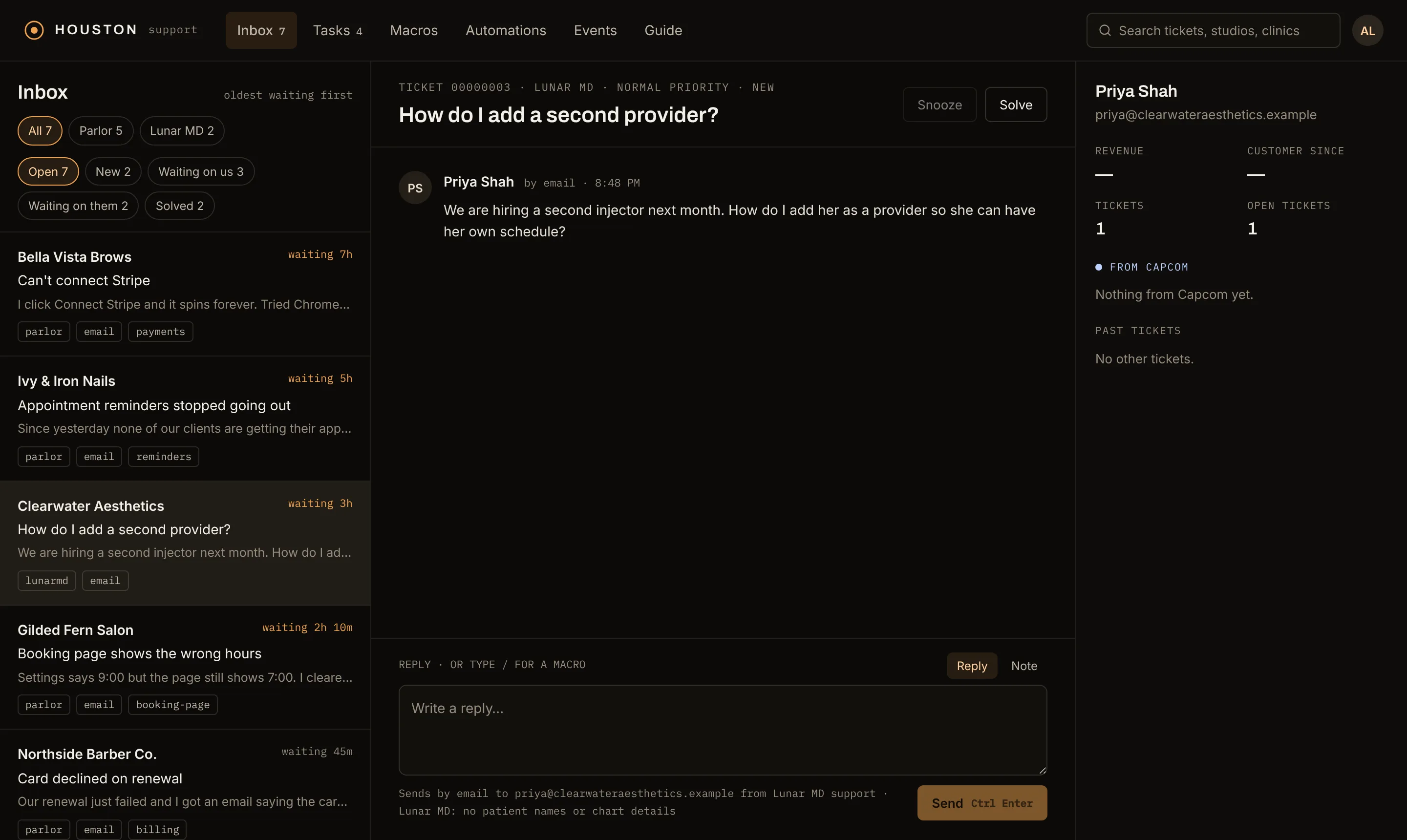
Houston’s inbox, oldest waiting first. Privacy note: every studio, clinic, person and address in this post’s screens is invented.
Why we built it
The day before, we had finished moving every email our apps send onto our own CRM, Capcom. Capcom talks to many people at once: product updates, onboarding, failed-payment emails. Support is the other direction. A customer starts it, and a person answers one customer at a time.
We wanted that person to see what Capcom already knows: who the customer is, what they pay, what we last sent them and what happened to it. So Houston is a separate product with its own screens, but it never keeps its own customers. It reads Capcom’s contacts, and a stranger who writes in becomes a Capcom contact.
The rules, before any code
As with Capcom, we wrote down what Houston may never do before deciding what it does.
Nothing reaches a customer without a person. Claude drafts; a person reads, edits and sends. The API enforces it, not the screen.
No patient data. Lunar MD serves medical spas, and support covers setup, billing and how-to only. Lunar MD tickets take no attachments, the auto-reply says “Don’t include patient names or chart details,” the reply box repeats it, and a purge removes a message body that slips through.
Email only. We decided in the first ninety minutes that support never sends or receives text messages. No phone-number replies, no “send by text” button.
One customer list. Contacts, the suppression list and email delivery belong to Capcom. Houston uses them and never forks them.
Two days
The first pull request opened at 9:11 PM on Monday. The support module, the decision to stay off text messages and the event bus between products were merged before midnight. Tuesday added agent drafting, the Houston app, white-glove automations and the mail setup. Houston reached production Wednesday morning, and support email went live at 2:02 PM.
MergedHourWhat shipped
Mon 9:11 PM0:00Plan written, first pull request opened
Mon 10:14 PM1:03Support module: tickets, threading, email in
Mon 10:43 PM1:32Decision: email only, no text messages
Mon 11:37 PM2:26Event bus between products, every listener declared with a reason
11:37 PM–7:59 AMOvernight
Tue 7:59 AM10:48Agent tools: drafts that cite their source, a second permission to send
Wed 10:49 AM37:38Capcom’s timeline shows support tickets
Wed 1:13 PM40:02Support mail configured, delivery: log only
Wed 1:55 PM40:44First email to support opens a ticket
Wed 2:02 PM40:51Delivery: log only → live
Real times, Eastern: merges, plus the first email to support. 40 hours 51 minutes from the first pull request to live, two nights included.
A queue you work from the keyboard
The inbox is ordered by how long each customer has waited, oldest first, and the server keeps that order. You work it without a mouse: j and k to move, Enter to open, r to reply, ⌘ Enter to send, s to solve, and the next waiting ticket opens by itself. Typing / in the reply box inserts a macro, a saved answer filled in for this customer.
The right-hand column is Capcom’s view of the customer: their business, revenue, how long they have been a customer, their other tickets, and the latest things Capcom recorded about them.
Claude drafts. A person sends.
Every action in Houston is also a tool an agent can call over MCP. Claude reads the queue, looks up the answer in our Learning Center, Parlor’s published how-to guides, and saves a reply as a draft on the ticket with the guide it came from. The draft does not move the ticket and is not in the conversation until a person sends it.
Drafts by default. The everyday permission can read tickets, draft replies, add internal notes and set priority and tags.
A second key to send. Sending, solving, snoozing and purging need a separate permission, plus a confirm text that names the ticket: “SEND” and its exact subject. Without it the API refuses.
Separate from Capcom. A Houston token opens no Capcom tool, so it cannot send a broadcast or switch on a sequence.
Every write is signed. The audit log records which agent did what, next to every person’s action.
agent session · houston MCP
youWhat’s waiting in Houston? Draft answers for anything the Learning Center covers.
→DRAFT saved on the ticket · 1 citation · not sent
agentDrafted a reply to Bella Vista Brows, citing the guide. Sending needs a separate permission and the confirm text “SEND Can’t connect Stripe”. It’s on the ticket for you.
youLeave it. I’ll read it there.
Replay with mocked data; no real customers appear. The agent can read and draft on its own; sending needs a second permission and the ticket’s exact subject.
White-glove, from real events
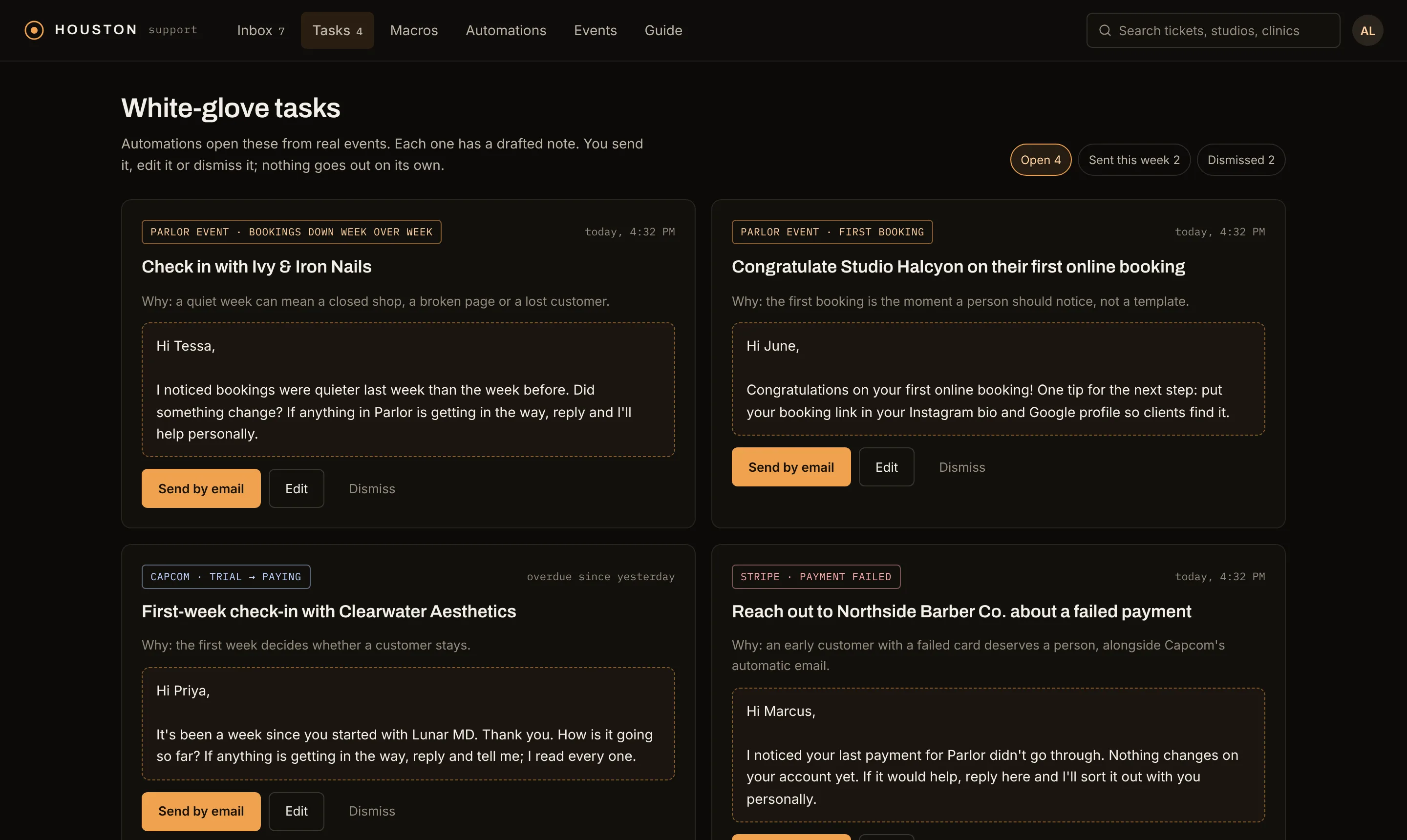
Some of the best support is a note nobody asked for. Houston’s automations watch for moments that deserve a person: a studio’s first online booking, a week where bookings fell, a customer’s first week after a trial, a failed card, a cancellation, a ticket past its response target. Each one opens a task with a drafted note and the reason it exists.
A person sends it by email, edits it, or dismisses it. Automations start as dry runs that record what they would have opened, and switching one on takes the same second permission as sending.
Tasks, each labeled with the event that opened it and the reason it exists. Drafts sit in a dashed box until a person sends them. The studios and clinics are invented.
Support email without a single mailbox
We did not create an inbox for support. There is no Google Workspace account and no IMAP server. Mail to [email protected] and [email protected] goes to Amazon SES, which hands each message to our API, and the API turns it into a ticket.
The help. subdomains are deliberate. A domain’s mail goes to one set of mail servers, and our main domains already deliver to the mailboxes we use every day. Support gets its own subdomain, so it never takes mail away from them. Forwarding from an existing mailbox was not an option either: forwarding breaks the check that proves a sender is who they say they are, and Houston uses that check to decide whose ticket a message belongs to.
02DNSThe MX record for help.parloros.com points at Amazon SES. No mailbox exists.
03Amazon SESRequires TLS, scans for spam and viruses, and accepts mail for any address at help.parloros.com.
04SNSPosts the whole message to our API, signed.
05Our APIChecks the signature and DMARC, finds the Capcom contact, opens or threads the ticket.
06HoustonThe ticket waits in the queue, oldest first, for a person.
The replyLeaves through SES from [email protected], signed for that domain, with Reply-To support+<thread>@help.parloros.com. When the customer answers, it takes the same path and lands on the same ticket.
The path of one support email. Lunar MD's runs the same way through help.lunarmd.com.
Going live, carefully
Support mail started in a mode that records every reply and sends none. We wrote to both addresses from an ordinary mail account. Each message opened a ticket in the right product, attached to a Capcom contact created on the first one, and recorded its auto-reply as logged. Then one configuration change switched delivery to live. Seven minutes passed between the first ticket and the switch.
What we took from it
The second product is faster than the first. Houston reused Capcom’s contacts, suppression list and email delivery, so most of its 41 hours went into the support desk itself.
Decide the never-list first. No sending without a person, no patient data, no text messages. Each one shaped the screens before they existed.
Agents get a draft box, not a send button. Claude does the reading and writing; the decision to reach a customer stays with a person, and the API holds that line.
Turn sending on last. A log-only mode let us test the whole path with real email before anything could reach a customer.